
For plenty of Australians who enjoy online casino games, fast internet isn’t always an option https://wazambaa.gr.com/en-au/. If you live in rural areas or just encounter a spot of network trouble, lag and slow loading screens are part of the deal. I set out to put Wazamba Casino, a well-known spot for Aussie players, through a real-world test. I reduced my connection significantly to see how it holds up. Ignore the typical talk about bonus offers for a moment. I aimed to know one basic thing: is Wazamba still entertaining and functional when your internet’s struggling? This is a direct look at what happens, from loading the homepage to playing a slot, all on a connection that replicates a slow Australian link.
Establishing the Slow Connection Test in Australia
I needed a test that felt real. Using network throttling software, I restricted my internet speed at 2 Mbps download and 0.5 Mbps upload. That’s a lot less fast than basic NBN, but it’s pretty standard for older ADSL2+ lines or a patchy mobile signal. I performed the test on both a desktop PC and a phone, since Aussies use both. I ensured to use Wazamba’s Australian site so the server distance was accurate. During the tests, I shut down every other app that might use the web. This way, any lag or delay was nearly always Wazamba’s problem to solve.
Playing Live Casino on Slow Connection
Real-time dealer games use up the most data, so I predicted issues. Accessing a live lobby was slow. The video stream automatically reduced to a reduced quality to avoid interruptions. The picture sometimes got blocky when there had heavy action, and the audio sometimes desynced with the croupier’s mouth. But the feed never completely stopped. The betting options, which appear on top of the stream, loaded on their own and functioned well. I was able to bet and type in the chat, though the whole experience felt a half-step behind. For players from Australia on a slow link, this indicates you can likely still play live dealer games, but you lose that clear, HD quality. If you need a stable connection, just allow the stream to remain in standard quality.
Making Deposits and Withdrawals involving Delay

When real money is involved, things need to be rock solid. Accessing the cashier section on Wazamba was no problem, even on the slow connection. The list of payment methods for Australia—things like credit cards, Neosurf, and Bitcoin—loaded up fine. When I accessed the actual deposit form, there was a short pause as the security features loaded in. The key part, the transaction processing time itself, didn’t seem any slower. That part relies on the payment company’s servers, not my dodgy internet. This is a major plus. While clicking through pages felt sluggish, the actual money transfer was secure and reliable. Withdrawals mirrored the same pattern: submitting the request had a small delay, but once sent, it went into the normal verification queue.
Navigating the Platform and Menus with Slow Connection
Clicking around a site on a slow internet shows you which casinos have done their homework. Wazamba’s main menu—with sections like ‘Casino’, ‘Live Casino’, ‘Promotions’, and ‘Sports’—still responded when I selected. But after each selection, I’d endure 3 to 5 seconds for the new page to render. You adapt to be patient. The game library search and filters were a bit more irritating. Typing a game name involved a lag before results popped up, and tapping a filter like ‘Slots’ caused a delay. Nothing failed, but it surely didn’t feel fast. If your internet is unstable, my advice is to select once and wait. Don’t mash the button, or you could confuse things.
First Look: Opening the Wazamba Lobby
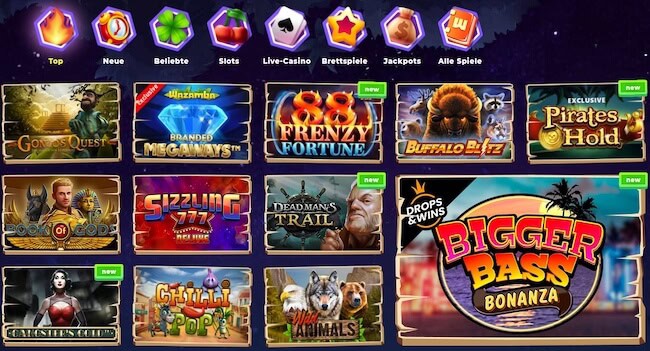
Just getting the homepage to show up was the opening hurdle. On my slowed-down connection, the vibrant jungle-themed lobby took a while. Where it usually pops up in a blink on fibre, this time it needed 12 to 15 seconds. The screen didn’t go blank or freeze, though. A simple page skeleton came up first, with the images and animations filling in after. This step-by-step loading is clever—it allows you can start looking around before the final graphic appears. Logging in went through, but it wasn’t quick. After entering my details, there was a delay of a few seconds before it logged me in. It successfully loaded my account dashboard without a page reload, which showed the back-end systems were functioning well even on a slow link.
Game Loading Times: Video Slots and Casino Table Games
This is where gamblers will either stick around or leave. I tried loading a bunch of well-known slots. More basic, classic-style games from makers like Pragmatic Play started in about 10 to 20 seconds. But the big, flashy video slots with all the 3D effects—especially from NetEnt or Play’n GO—took much longer. Some required 30 to 45 seconds to get going. The games did display a loading bar, so you could see something was going on. Once a game was finally ready, the spins and gameplay were fluid because that part works on your device. Table games like blackjack or roulette were a safer choice, often loading in under 10 seconds. The ‘Demo’ or free-play mode operated exactly the same way, which is perfect for testing a game’s load time without spending a dollar.
Help Desk Accessibility During Poor Connectivity
If you’re having internet problems, you need to be able to get help. Wazamba’s help section, boasting a big FAQ library, displayed its content very quickly. The live chat, which is what most people want, worked surprisingly well. The chat window loaded, and I was connected to an agent without getting dropped. Messages sent and received with slight latency, but the conversation remained active. Email support is clearly unaffected by a slow connection. They include a telephone number; calling it on a mobile or landline would skip the internet problem completely. The key takeaway is, if your own connection is failing, Wazamba’s support channels are still there as a backup.
Useful Advice for Aussies Competing on Unstable Internet
After running through all this, here is a way to make Wazamba perform better on a poor connection. If there is mobile app, try it. Apps can occasionally run better than a browser. Choose games that are less demanding on graphics. Classic slots, table games, or video poker load quicker than the latest cinematic slot. When you are navigating the site, take a breath between clicks. For live dealer games, attempt playing outside of peak evening hours—the stream might be more stable. And keep in mind to disable downloads or video streaming on other devices in your house before you begin playing. One last trick: employ the ‘Favourites’ heart icon to store your go-to games. Once you have them bookmarked, you can jump straight to them next time without looking through the whole library again. It saves both time and data.
LEAVE A COMMENT